
Blog
Best Smart Locks for Renters in 2026 (No Drill)

The best smart locks for renters install over the deadbolt you already have, so you keep your key, keep your deposit, and take the lock with you when you move. That rules out most full deadbolt replacements and points to retrofit locks.
Below are five picks, from an easy overall choice to a cheap fingerprint option. We compared specs, manufacturer documentation and reviewer reports; none require drilling if you choose a retrofit model and measure your deadbolt first.
- Best overall: August Wi-Fi Smart Lock — retrofit, keeps your key, works with every assistant.
- Easiest install: SwitchBot Lock — peel-and-stick, add a keypad or fingerprint.
- Most hidden: Level Bolt — invisible inside the deadbolt.
- Cheapest fingerprint: Wyze Lock Bolt — if you can swap the deadbolt and keep the original.
- Before you buy: measure your deadbolt and check your lease on lock changes.
Which smart lock should a renter get?
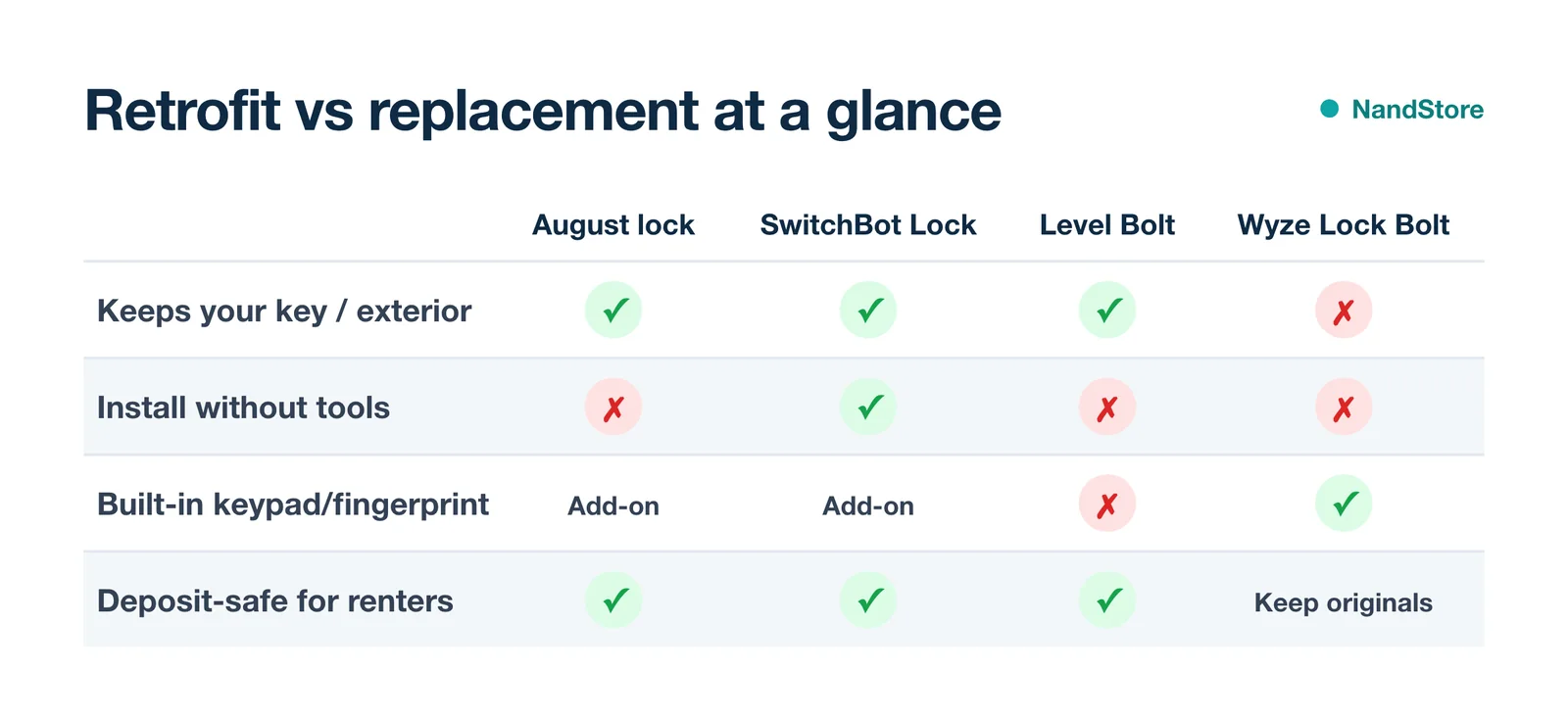
The best smart locks for renters
August Wi-Fi Smart Lock
Keyless entry that fits over your existing deadbolt and keeps your key working.
- Retrofit, interior only
- Alexa · Google · Siri
- Auto-lock/unlock
- Wi-Fi built in
Best for: Most renters
- No exterior change, so it’s deposit-safe
- Works with all three assistants
- Auto-unlock as you arrive
- Rechargeable battery to top up
- Keypad is sold separately
It mounts inside over the deadbolt, so the building’s key still works in the same lock.
Check price on AmazonSwitchBot Lock (with Keypad)
Peel-and-stick onto the deadbolt thumbturn, then add a keypad or fingerprint pad.
- Adhesive, no tools
- Keypad/fingerprint add-on
- Matter via hub
- Fits most deadbolts
Best for: Budget and no-tools installs
- Sticks on in minutes
- Keypad and fingerprint options
- Keeps your existing key
- Needs the hub for remote, voice and Matter
- Bulky interior unit
Remote unlock, Alexa, Google and Matter all need the separate SwitchBot Hub.
Check price on AmazonLevel Bolt
The motor hides inside the deadbolt, so the door looks completely unchanged.
- Invisible, inside the deadbolt
- Apple Home · Alexa
- Keeps your key
- Premium build
Best for: Keeping the door’s original look
- Invisible from the hallway
- Keeps your key and exterior
- Quiet, premium motor
- Premium price
- You swap the bolt mechanism, so keep the originals
Yale Approach with Wi-Fi + Keypad
A retrofit that keeps your key but adds a code keypad and Wi-Fi.
- Retrofit, keep your key
- Add-on keypad
- Alexa · Google
- Matter-ready module
Best for: Renters who want a code, not a key
- Keypad entry without losing your key
- No exterior deadbolt swap
- Works with Alexa and Google
- Keypad and Wi-Fi are add-ons
- Larger interior unit
Wyze Lock Bolt
Fingerprint and code entry at a low price, if you can replace the deadbolt.
- Fingerprint + keypad
- Deadbolt replacement
- Bluetooth only
- Months of battery
Best for: Budget fingerprint entry
- Fast fingerprint unlock
- Inexpensive
- Battery lasts months
- Replaces the deadbolt entirely
- Bluetooth only, no remote on its own
It swaps the whole deadbolt, so keep the original lock in a bag to reinstall when you move out.
Check price on AmazonRetrofit vs replacement: what renters need to know
What is a retrofit smart lock?
A retrofit lock attaches to the inside of your door over the existing deadbolt. The outside of the door, and your key, stay exactly the same — which is why retrofits are the renter-friendly choice.
When a replacement lock is OK
Replacement locks, like fingerprint deadbolts, change the whole lock, so you usually need landlord approval. Keep the original deadbolt in a bag and reinstall it before you move out.
If a lock feels like too much, a security camera or video doorbell covers the entry without touching the door at all.
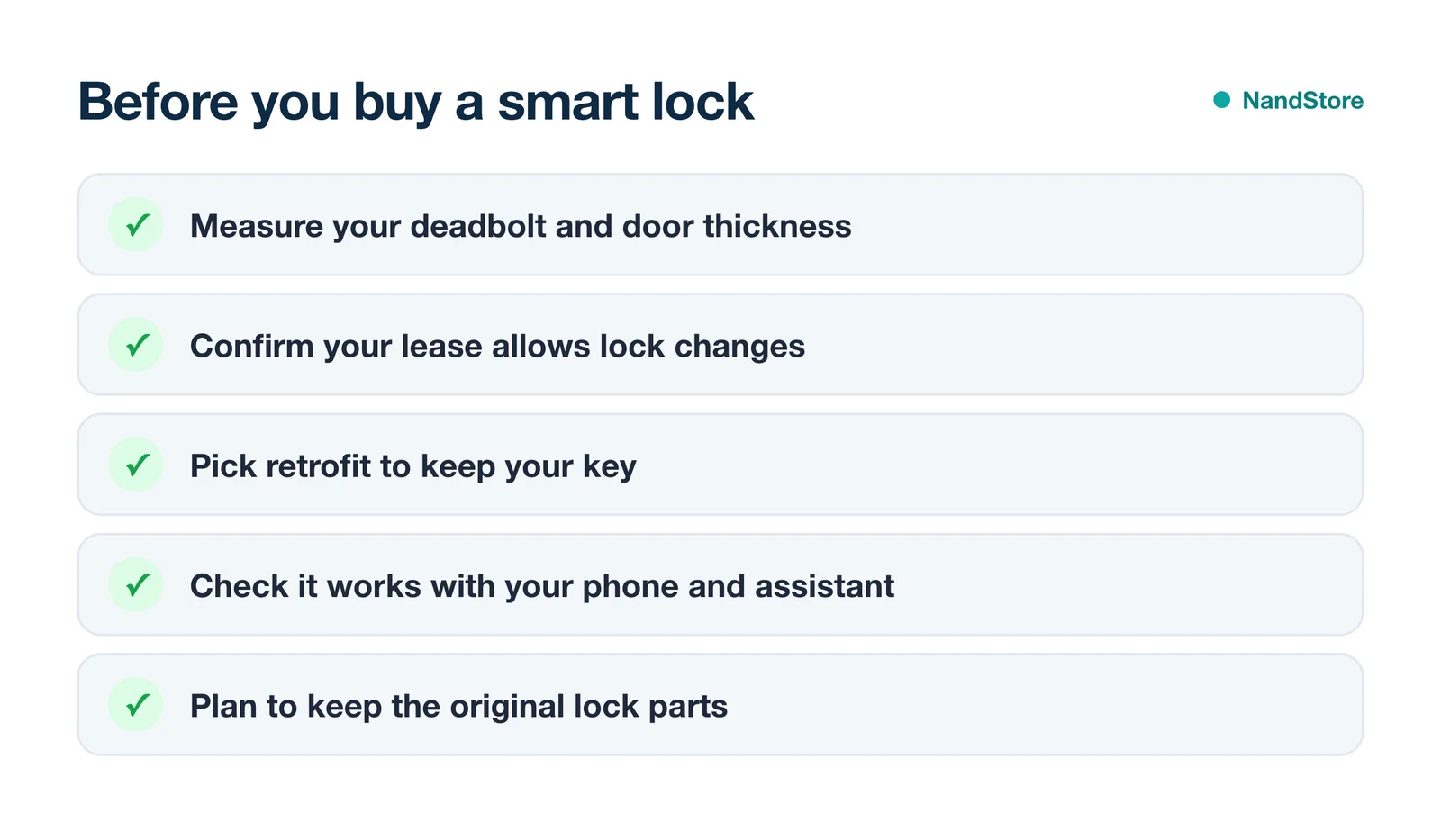
Choose a retrofit lock, or keep every original part. Swapping a deadbolt and losing the pieces is the fastest way to lose part of your deposit.
How a smart lock fits the rest of your setup
A smart lock pairs naturally with the rest of a no-install setup. See our renter’s guide to a smart home for the full picture, and check Alexa vs Google Home so your lock answers to the assistant you already use.
Shopping for someone else? A retrofit lock is a strong gift — it’s one of our picks in the smart home gift guide for renters.
Can renters install a smart lock without drilling?
Yes. Retrofit smart locks like the August or SwitchBot attach to the inside of your existing deadbolt using the screws already there or with adhesive, so there’s no drilling and no change to the outside of the door.
Do I need my landlord’s permission for a smart lock?
For a retrofit lock that keeps your existing deadbolt and key, usually not. For a full replacement lock, check your lease and keep the original lock to reinstall when you move out.
What’s the best smart lock for an apartment?
The August Wi-Fi Smart Lock is the best all-round pick: it’s a retrofit, keeps your key, and works with Alexa, Google and Siri. SwitchBot is the budget, no-tools alternative.
Can a smart lock work with Alexa or Google?
Yes for most. August, SwitchBot (with its hub) and Yale work with Alexa and Google; Level works with Apple Home and Alexa. Unlocking by voice usually requires a PIN.
Will a smart lock run on batteries?
All of these do. Expect several months per charge or battery set, with low-battery alerts in the app so you’re not caught out.
Most renters should get the August Wi-Fi Smart Lock: it retrofits over your deadbolt, keeps your key, and works with every assistant. Pick SwitchBot to save money, or the Wyze Lock Bolt for fingerprint entry if you can swap the deadbolt.