
Blog
Matter vs Thread for Renters, Explained (2026)

Matter is the common language that lets smart devices work with Apple Home, Google Home and Alexa. Thread is one of the networks Matter devices can use to talk, alongside Wi-Fi. Renters can use both without installing anything.
The practical question is whether you need a Thread border router. If you own a recent Echo, Nest hub or HomePod, you probably have one already. We compared specs, manufacturer documentation and reviewer reports for this guide.
- Matter decides which apps a device works with; Thread is a way for it to connect.
- Matter over Wi-Fi needs only a controller, like an Echo, Nest speaker or HomePod.
- Thread devices also need a Thread border router, which many recent speakers already are.
- Moving out? Factory reset each device and add it again in the new place.
Matter vs Thread at a glance
| Question | Matter | Thread |
|---|---|---|
| What is it? | A common language for smart devices | A low-power wireless mesh network |
| What else do you need? | A controller (Echo, Nest or HomePod) | A Thread border router |
| Uses your Wi-Fi? | Runs over Wi-Fi, Thread or Ethernet | No, it’s a separate network |
| Best for | Mixing Apple, Google and Alexa | Battery sensors and fast local control |
| Renter catch | Wi-Fi devices want 2.4 GHz | You need one border router |
What is Matter?
Matter is a standard from the Connectivity Standards Alliance. A device with the Matter logo can be added to Apple Home, Google Home, Alexa or SmartThings, so you aren’t locked into one brand’s app.
It also supports multi-admin: one device can appear in several apps at once, so housemates on different phones can share a lamp. The current version is Matter 1.6, released in June 2026.
What is Thread?
Thread is a low-power mesh network built for smart home gadgets. Plugged-in Thread devices pass messages along for each other, so the network gets stronger as you add plugs and bulbs.
Because Thread doesn’t use your Wi-Fi, it suits battery sensors and crowded apartment buildings. Under Thread 1.4, border routers from different brands are meant to share one network instead of each starting their own.
Do you need a Thread border router?
Only for Thread devices. A border router connects the Thread mesh to your home network, and you may already own one:
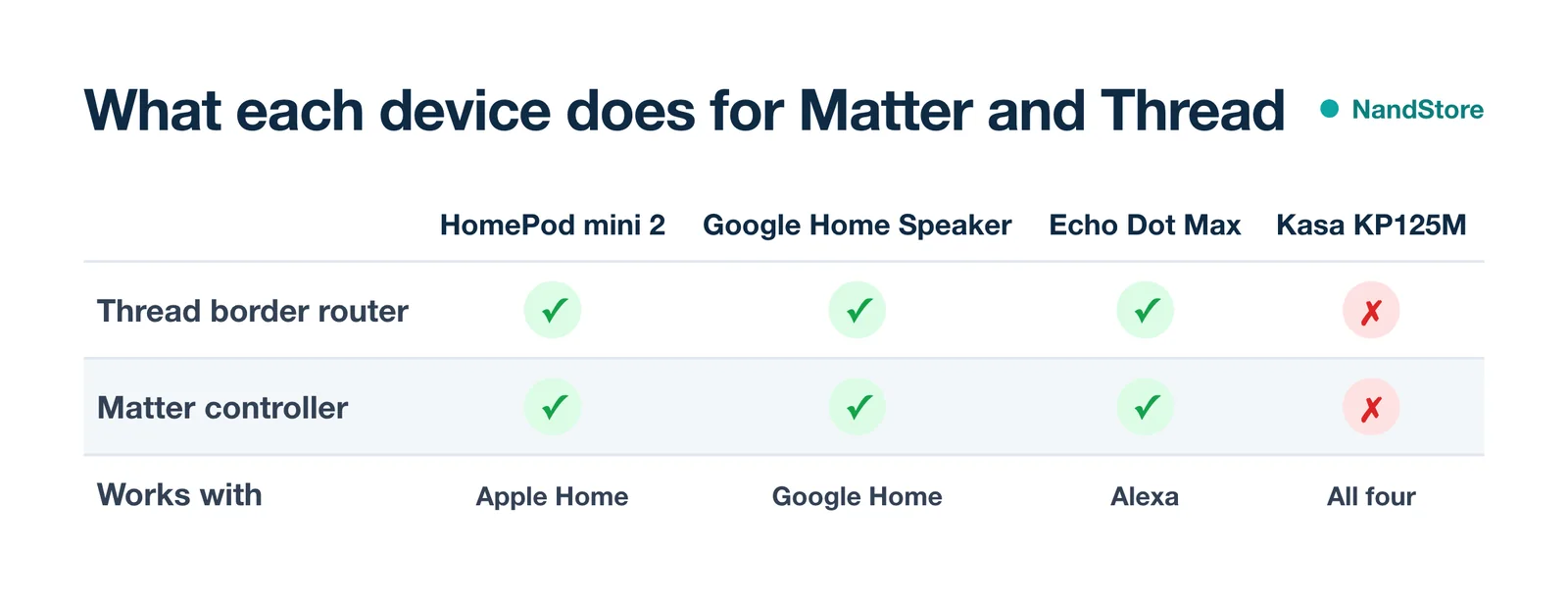
- Apple: HomePod mini (both generations), HomePod (2nd gen), Apple TV 4K with Ethernet
- Amazon: Echo Dot Max, Echo (4th gen), Echo Hub, Echo Show 8 (4th gen)
- Google: Google Home Speaker, Nest Hub (2nd gen), Google TV Streamer, Nest Wifi Pro
Matter-over-Wi-Fi devices, like the Kasa KP125M plug, skip all this. They need only a Matter controller, which is the same Echo, Nest or HomePod you’d use anyway.
How do you add a Matter device?
- Plug it in nearbyKeep your phone close; setup uses Bluetooth to find the device.
- Open your home appUse Apple Home, Google Home or the Alexa app and choose Add device.
- Scan the Matter codeScan the QR code on the device or box, and keep a photo of it for later.
- Name it and pick a roomTo share it with another app, use that app’s Matter pairing option.
Matter-over-Wi-Fi devices in practice need a 2.4 GHz Wi-Fi network, and setup can fail if your phone is on 5 GHz only. Most routers broadcast both; make sure 2.4 GHz is on.
Remove each device from your app, factory reset it, and add it again in your new home. Keep the Matter codes, because you’ll scan them again.
Devices that get you started
Apple HomePod mini (2nd generation)
Apple’s small speaker doubles as a Thread border router and an Apple Home hub.
- Thread border router
- Apple Home hub (Matter)
- Siri
- Wi-Fi 6E
Best for: iPhone and Apple Home users
- Makes an Apple home Thread-ready
- Runs Apple Home automations
- Small and plug-in
- Built for iPhone homes, not Android
- Pricier than budget speakers
The original HomePod mini is a Thread border router too, so if you already own one you’re set.
Check price on AmazonGoogle Home Speaker
Google’s Gemini speaker, with a Matter hub and a Thread border router built in.
- Gemini for Home
- Matter hub
- Thread border router
Best for: Android and Google Home users
- Matter and Thread built in
- Gemini handles natural requests
- Best features need Google Home Premium
- Works with Google Home only
A Nest Hub (2nd gen), Google TV Streamer or Nest Wifi Pro is also a Thread border router.
Check price on AmazonAmazon Echo Dot Max
A compact Alexa+ speaker with Matter, Thread and Zigbee hubs inside.
- Alexa+
- Matter · Thread · Zigbee hub
- Compact speaker
Best for: Alexa users
- Thread border router and Zigbee hub in one
- Alexa+ included with Prime
- Alexa+ costs extra without Prime
- Alexa only
Kasa Matter Smart Plug KP125M
A Matter-over-Wi-Fi plug: no border router needed, and it works on every big platform.
- Matter over Wi-Fi
- Apple · Google · Alexa · SmartThings
- Energy monitoring
- Bluetooth setup
Best for: Trying Matter for the first time
- No Thread border router needed
- Works on every major platform
- Energy monitoring
- 2.4 GHz Wi-Fi only
- Pricier than the non-Matter EP25
Eve Energy
A Thread plug that stays off your Wi-Fi and strengthens your Thread mesh.
- Matter over Thread
- Apple · Google · Alexa · SmartThings
- Energy monitoring
- Needs Thread border router
Best for: Homes that already have a border router
- Doesn’t crowd your Wi-Fi
- Plugged in, so it extends the mesh
- Detailed energy history
- Needs a Thread border router
- Costs more than Wi-Fi plugs
Keep reading
Matter plugs are the easiest first step; see best smart plugs. For lighting, our best smart bulbs for renters covers Matter and Thread bulbs.
Still choosing a platform? Read Alexa vs Google Home, then the renter’s guide to a smart home. Matter devices also make easy gifts: see the smart home gift guide.
Is Matter the same as Thread?
No. Matter is the standard that lets devices from different brands work together. Thread is a low-power wireless network that some Matter devices use; others use Wi-Fi.
Do I need a hub for Matter?
You need a Matter controller, usually a smart speaker or display you may already own, like an Echo, Nest speaker or HomePod. Wi-Fi Matter devices need nothing else; Thread devices also need a Thread border router.
What is a Thread border router?
It’s the bridge between a Thread mesh and your home network. The HomePod mini, Echo Dot Max, Google Home Speaker and Nest Hub (2nd gen) are all Thread border routers.
Can I use a Matter device with Apple, Google and Alexa at the same time?
Yes. Matter’s multi-admin feature lets one device appear in several apps at once, so housemates on different phones can share it.
What happens to my Matter devices when I move?
Remove them from your app, factory reset each one, and add it again in your new home. Nothing is wired in, so it all comes with you.
Which Matter version is current?
Matter 1.6, released in June 2026, with a 1.6.1 update in September. Version 1.6 added NFC setup, and 1.5 in late 2025 added cameras.
If you own a recent Echo, Nest hub or HomePod, you’re probably Thread-ready already. Start with a Matter-over-Wi-Fi plug like the Kasa KP125M, then add Thread devices once a border router is in place.